


Executive Summary
A digital sign is a public-facing communications tool with a networked computer behind the screen. Its security depends on more than the display cabinet: the controller, management software, user accounts, network equipment, and support arrangements all need attention.
For buyers, the useful question is not whether a sign is “unhackable.” It is whether the proposed system has documented protections, a sensible installation plan, and clear responsibility for keeping those protections working. This guide outlines questions to discuss with your sign supplier and IT team before installation.
- The schedule stays with the sign. For local playback, uploaded content and schedules run from memory in the sign. Losing the cloud connection does not by itself stop playback while the sign remains powered and operational.
- Hidden does not mean secure. Hiding a Wi-Fi network’s name does not make it invisible to discovery tools or replace authentication and encryption. [5]
- Creating is not the same as publishing. Where the software supports separate roles, someone can prepare a message without permission to put it on the sign. Ask which approval controls your platform offers. [1]
1. START WITH ACCESS
A stolen publishing account can put unauthorized messages on a display even when its network connection is encrypted. Give each authorized user an individual account, use unique passwords, and enable multifactor authentication (MFA) where supported. Prefer phishing-resistant methods, such as security keys or passkeys, where the platform offers them. MFA adds protection, but available methods differ in their resistance to phishing. [1,2]
Ask which users can create content, approve it, publish it, and change system settings. Separate those responsibilities where the software supports it. Remove access when employees or contractors leave, and define how vendor access will be authorized and withdrawn. Do not assume that every cloud platform offers the same approval workflow or account controls. [1]
2. SEPARATE SIGNAGE FROM BUSINESS SYSTEMS
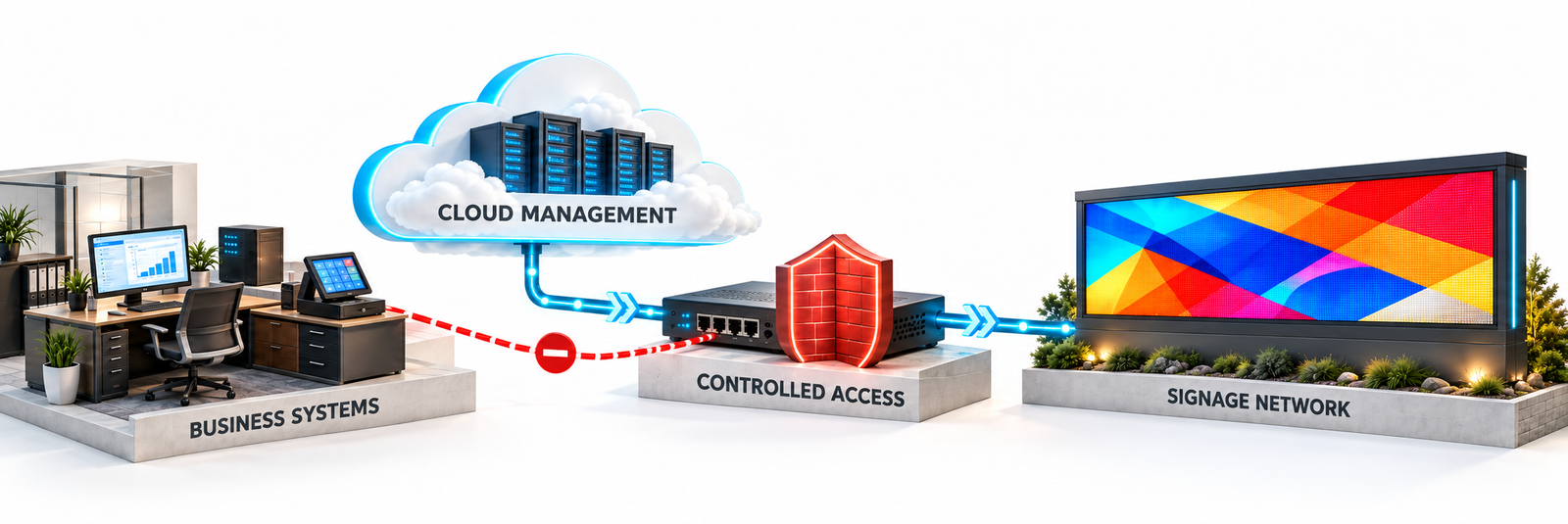
A sign should not need unrestricted access to payroll, payment systems, or other sensitive business resources. Have IT design a dedicated network segment and permit only the communication needed for management and operation. A VLAN is useful only when routing, firewall rules, and access policies enforce the intended separation. [3]
Document the required destinations, ports, and remote-support paths with the supplier. Avoid exposing controller administration directly to the public internet. Dedicated cellular connectivity may provide a separate connection, but it still needs secure accounts, configuration, and maintenance; it is not a guarantee of isolation or safety. [3]
3. CHECK WHAT ENCRYPTION ACTUALLY COVERS
Ask how communications are protected between the browser, cloud service, controller, and any remote-support tools. TLS, commonly used by HTTPS, can protect data in transit. A VPN may be appropriate for a particular access path, but it does not replace authentication, secure endpoints, or access restrictions. [4]
Wi-Fi security covers the wireless connection, not every stage of the system. Use supported, current wireless security with IT-approved configuration. Hiding the network name does not provide meaningful protection against someone looking for the network. [5]
Encryption of stored media is a separate capability. Content being saved locally does not prove it is encrypted. Ask the supplier to distinguish protection in transit, protection at rest, and the controls that prevent unauthorized changes. [4]
4. CONTENT AND SCHEDULES RUN FROM THE SIGN
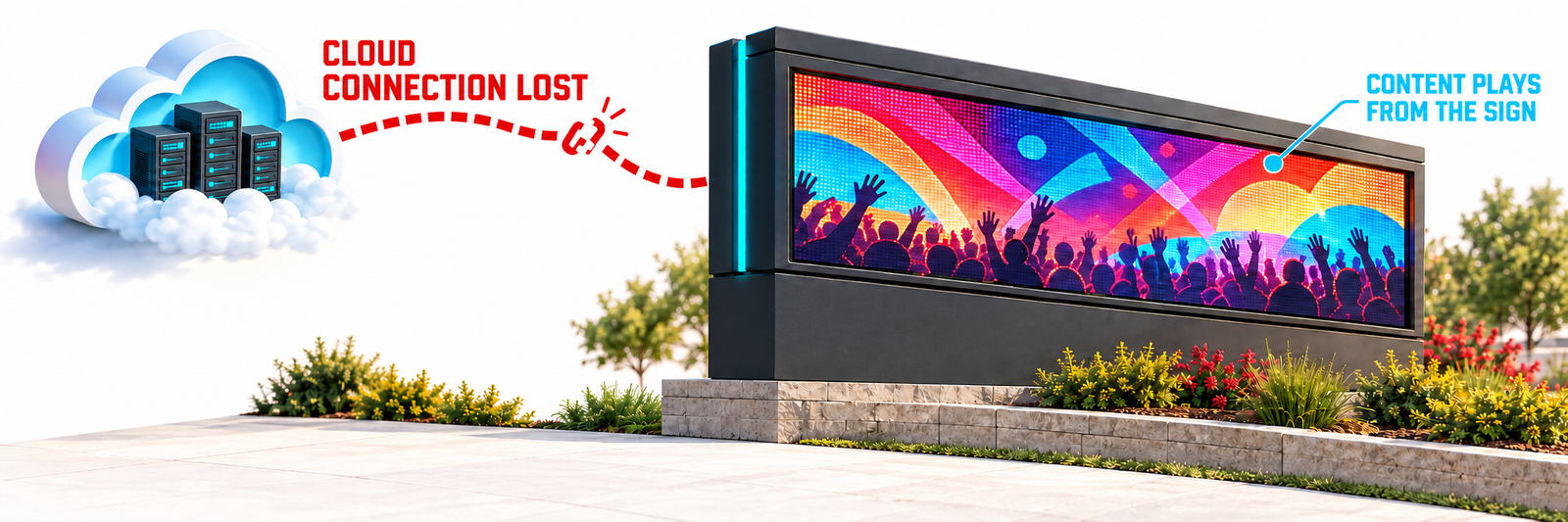
For stored playback, the cloud management system is where you create your content, organize messages, and set the schedule. You then upload both the content and the schedule to the sign. The sign stores that information in its own memory, and its controller plays the content and follows the schedule locally. [6]
Once the upload is complete, the sign does not need a constant connection to the cloud to play its stored content or follow its uploaded schedule. Losing the cloud connection does not, by itself, stop that playback. The sign continues running from its own memory while it remains powered and operational.
Reconnect when you need to upload new content or change the schedule. A connection is required to transfer those updates, not to keep already uploaded content playing. Features that rely on live online data are a separate case and may still require connectivity.
That operating benefit does not make a controller immune to compromise. Local content, user accounts, software, and management interfaces still need protection. Choose the playback approach for the application, then evaluate its security controls separately.
5. PLAN FOR THE YEARS AFTER INSTALLATION
Identify who maintains the controller, router, and cloud accounts. Ask how security updates are delivered, how long each component will receive support, and how customers learn about vulnerabilities or end-of-support dates. Restrict unused interfaces and services, and protect physical access to the controller and network equipment. [1,7]
Keep an inventory of the installed equipment and approved users. Establish a routine for reviewing access and available activity records. Agree on a response procedure for unauthorized content: who can stop publishing, revoke access, contact support, and restore approved operation. Recovery arrangements should be documented and tested with the supplier and IT team.
BEFORE YOU APPROVE THE SYSTEM
Request a written record of:
- The controller and cloud platform being supplied.
- Available MFA, user roles, approval controls, and activity records.
- Required network connections and the proposed separation from business systems.
- Protection for communications and, where needed, stored data.
- Offline playback behavior and a practical outage test.
- Update ownership, support life, and the incident-response contact.
Security is an ongoing operating responsibility. Documented capabilities, careful configuration, and a clear maintenance plan give buyers a stronger basis for comparison than broad claims that a particular connection or playback method prevents hacking.
SOURCES
[1] NIST. IoT Device Cybersecurity Requirement Catalogs: Logical Access to Interfaces. https://pages.nist.gov/IoT-Device-Cybersecurity-Requirement-Catalogs/technical/logical/
[2] CISA. Implementing Phishing-Resistant MFA. https://www.cisa.gov/sites/default/files/2023-01/fact-sheet-implementing-phishing-resistant-mfa-508c.pdf
[3] UK National Cyber Security Centre. Secure connectivity principles for operational technology: Principle 6, Limit the impact of compromise. https://www.ncsc.gov.uk/collection/operational-technology/secure-connectivity/principle-6
[4] UK National Cyber Security Centre. Device security principles for manufacturers: Protect data at rest and in transit. https://www.ncsc.gov.uk/collection/device-security-principles-for-manufacturers/protect-data-at-rest-and-in-transit
[5] Information Commissioner’s Office. Wi-Fi security. https://ico.org.uk/for-the-public/online/wifi-security
[6] NovaStar. NovaLCT LED Configuration Tool for Multimedia Player, User Manual V5.3.0. Illustrative controller documentation; not a statement of NEXT’s supplied equipment. https://oss.novastar.tech/uploads/2020/04/NovaLCT-LED-Configuration-Tool-for-Multimedia-Player-User-Manual-V5.3.02.pdf
[7] NIST. IoT Device Cybersecurity Requirement Catalogs: Software Update. https://pages.nist.gov/IoT-Device-Cybersecurity-Requirement-Catalogs/technical/update/
Sources reviewed October 23, 2026. This paper provides general purchasing and deployment guidance; capabilities must be verified for the selected equipment and service.
