
Connectivity & Communication
Choose a connection that keeps updates reliable, secure, and easy to budget
Connectivity for LED Digital Signs
Connectivity is the difference between an LED digital sign that’s easy to update and one that becomes a constant troubleshooting project. The method you choose affects everyday operation—how reliably the sign stays connected, how quickly you can push updates, and how much you have to rely on local networks or IT support. It also affects budget: Wi-Fi may look “free,” cellular typically adds a monthly plan, and fiber or other wired options can add upfront installation cost.
When you understand those tradeoffs early, you can choose a communication method that fits your site and avoids surprises later.
Option 1: Wi-Fi
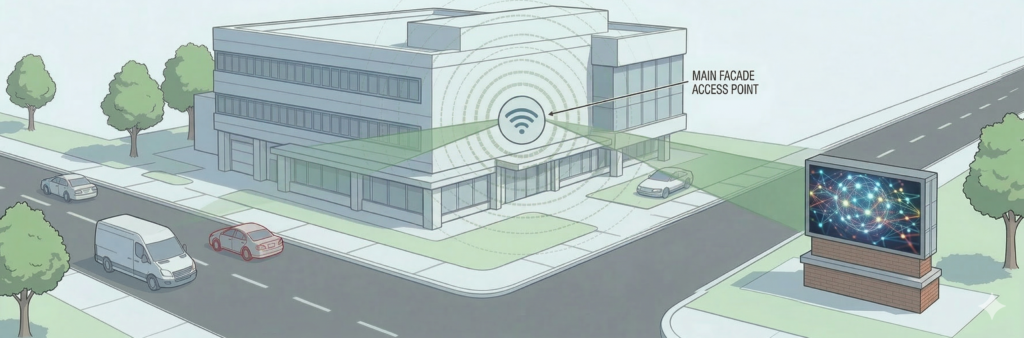
Wi-Fi feels like the easiest answer because it’s already “there.” The issue is that Wi-Fi is shared space. You’re competing with every phone, router, printer, and neighboring business for airtime—especially in the 2.4 GHz band.
When Wi-Fi can work well
- Smaller sites with light network traffic
- A well-managed business network with strong coverage
- Short distances and clean signal paths (not through multiple walls or metal structures)
Why Wi-Fi can become frustrating
- Congestion in busy areas (shopping centers, office parks, schools, multi-tenant buildings)
- Interference from many nearby networks and devices
- In 2.4 GHz, there are only a few non-overlapping channels, so crowding is common
- If the sign depends on Wi-Fi and Wi-Fi is unstable, the sign becomes “unreliable” even if the hardware is fine
If you’re trying to avoid “mystery problems” later, Wi-Fi is usually the first option to question.
Option 2: Cellular modem
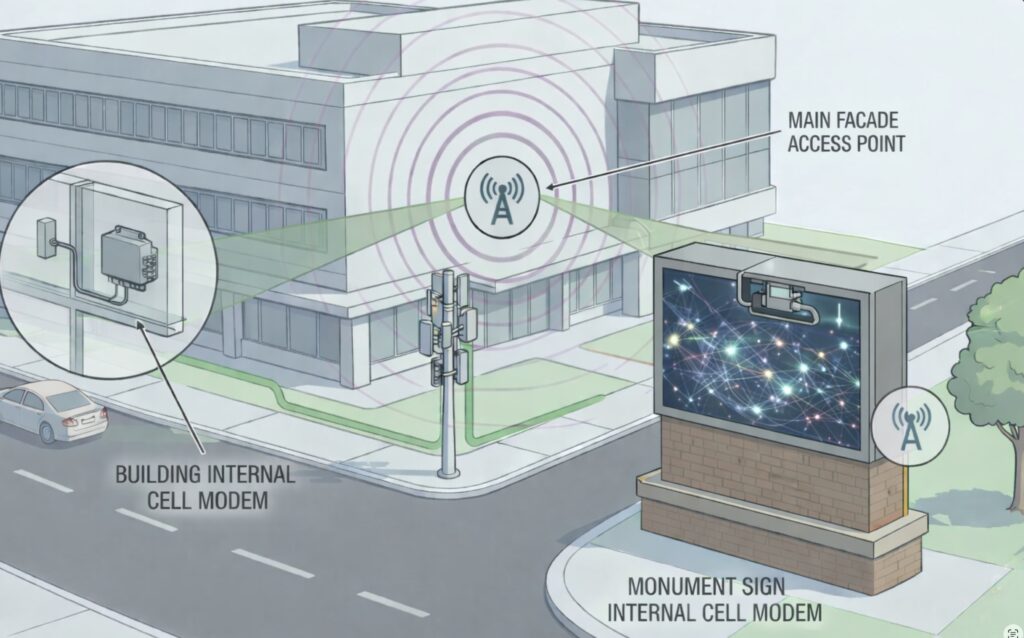
Cellular is often the easiest way to get a reliable connection to an LED digital sign without depending on the property’s internal network. It’s commonly used for machine-to-machine and IoT-style connections, where the goal is consistent uptime with minimal fuss.
When cellular is a great fit
- Your sign is not near a stable wired network connection
- You want the sign’s connection to be independent of the building’s Wi-Fi
- You’re managing the sign remotely and want a consistent path to it
- You want a clean setup without coordinating with IT departments or shared networks
Security (buyer-friendly explanation)
Cellular isn’t “automatically secure” just because it’s cellular, but it can be configured in a very controlled way. Many cellular deployments use private networking options (like private APNs and VPN routing) so the device traffic is handled more like a managed connection than an open public endpoint. The practical point is: cellular can reduce exposure and reduce dependence on shared local networks, which is a common security win.
What to plan for
- Monthly data/service plan
- Adequate cellular signal at the install site
- A basic plan for who has access to sign control (good password habits still matter)
Option 3: Fiber or wired internet
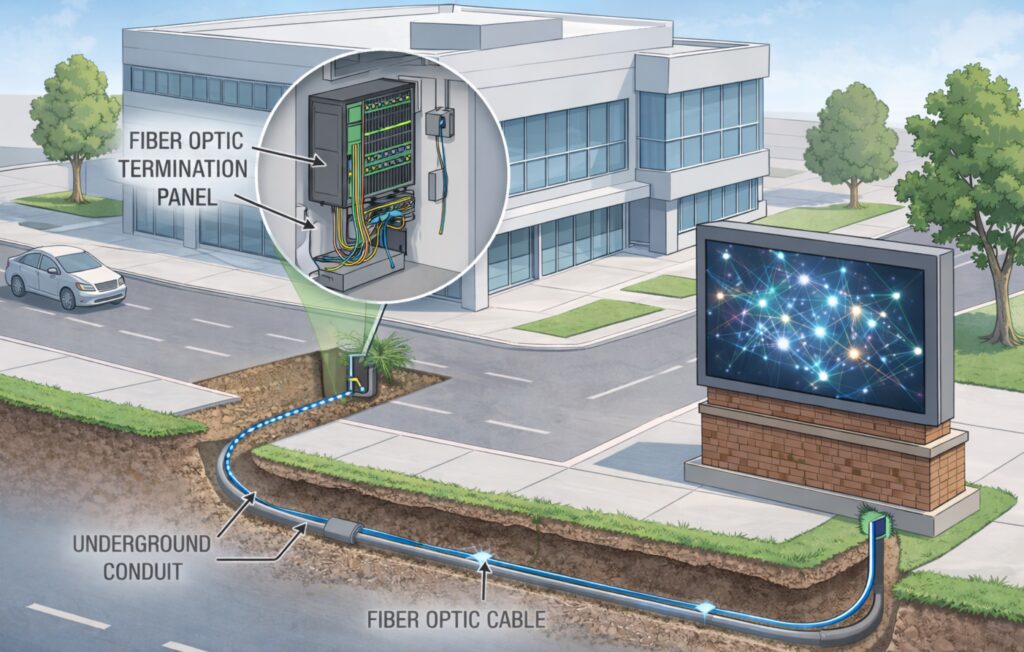
Fiber (or other wired connectivity) is the “most stable” option when it’s available. It’s high bandwidth, consistent, and not affected by wireless congestion. Fiber is also immune to electromagnetic interference, which is part of why it’s used in mission-critical environments.
When fiber/wired is the best choice
You want the most reliable connection possible
- You’re installing a large LED display system
- You’re in an environment where wireless is crowded or unpredictable
- You want clean, consistent performance for updates and management
What to plan for
- Getting the network connection to the sign location (trenching, conduit, or internal building runs)
- Coordination with IT or the property owner
- Installation cost may be higher upfront, but reliability tends to be excellent
How to choose the right connectivity for your sign
If you’re deciding quickly, ask these questions:
Do you control the network where the sign is installed?
If you don’t control the network (shared building, multi-tenant, school district IT, etc.), Wi-Fi can become a headache. Cellular often avoids that.
How important is remote access and “set it and forget it” reliability?
If this sign needs to stay current and you don’t want to babysit connectivity, cellular or wired is usually the safer direction.
How close is the sign to the best network source?
If you can easily hardwire, wired options tend to be strong. If the sign is far from network access, cellular is often the cleanest solution
The Takeaway
Wi-Fi can be convenient, but it’s not always the most reliable option for LED digital signs—especially in busy environments. Cellular modem connections can offer a more independent, managed path for remote sign control. Fiber or wired connectivity is often the most stable option when performance and uptime are the priority.
If you’d like a quick recommendation, share your install type (outdoor or indoor), the sign location, and whether you control the network on site. We can help you choose the most practical connectivity option without overcomplicating it.
Sources referenced: FCC Wi-Fi band/channel guidance; general industry networking standards; cellular IoT/private networking practices; fiber networking fundamentals.

Frequently Asked Questions About LED Sign Communication

Yes. If your LED sign uses cloud-based software, you can update content from almost anywhere with internet access. You are not tied to one office computer, and you do not have to be on-site to make changes. That makes it easier to post announcements, promotions, schedule updates, and other time-sensitive messages whenever needed.
- Access your sign from the office, from home, or while traveling
- Use a desktop, laptop, or tablet with internet access
- Update messages without being physically at the sign location
That depends on the communication method and the layout of the site. Some signs can be connected with a shorter direct run, while others may need cellular, wireless communication, or underground fiber. The distance to the road, the placement of the sign, and any obstacles on the property all play a role in choosing the best option.
- Longer distances may require fiber, cellular, or wireless communication
- Site layout and obstacles can affect which method works best
- The right solution depends on the specific conditions at your location
No, your LED display does not need to be connected to your primary internal network. In fact, over 75% of municipalities, school districts, and enterprise businesses now utilize dedicated cellular modems to keep their digital signage entirely isolated from their secure internal networks. Cloud-based software allows you to push content securely to the display via this independent cellular connection, eliminating the need to coordinate complex firewall permissions with your IT department while maintaining a 99.9% uptime for remote message management.
The sign will keep running the messages and schedule already stored in its onboard memory. LED signs are designed to play content from the sign itself, so losing internet access does not usually cause the display to go blank. The main limitation is that you may not be able to send new updates until the connection is restored.
- Messages and schedules are typically stored in the sign’s onboard memory
- The display continues to run even if internet access is interrupted
- Live-streamed content is the main exception because it depends on an active connection

Not sure which connection option makes the most sense for your sign?
Things like location, reliability, and how often you plan to update your content all play a role. Whether you’re considering cellular, Wi-Fi, or a hardwired connection, the goal is to choose something that works consistently without adding extra complexity.
If you’d like to talk through your setup, call 888-359-9558. We can walk through your location, how you plan to use the sign, and help you choose a connection that fits the way you actually work.