
Choosing the Right Location for Your Outdoor Sign
Sign placement for Outdoor LED Signs
Outdoor LED Digital Signs: Readability in Motion and Zoning Reality
Outdoor signs are usually viewed while people are moving. That might be slow movement in a parking lot, moderate speed on a street, or faster traffic on a road where drivers have only a few seconds to notice and understand what you’re saying. Because of that, the location you choose for an outdoor sign should be planned around three practical realities:
Viewing distance
Outdoor viewing distance varies widely. Some signs are read from 50–100 feet away at an entrance or driveway. Others are read from 150–300 feet away on a street. The more distance involved, the more important it becomes to keep messages simple, bold, and easy to process. When you choose location, you’re really choosing what your typical viewing distance will be—because that’s what determines how large your text should be and how clean the message needs to stay.
Driving speed
Speed changes everything. Drivers on a slower road might have enough time to read a few short lines. Drivers on a faster road do not. Even in areas where people “could” slow down, you should design for the reality that many will not. That means your sign location should be where people naturally have time to look—near intersections, entrances, or stretches of road where traffic slows. If the sign is placed after the turn-in point, or where the road is too fast, you lose the moment when the message matters most.
Time on message (how long each message displays)
Outdoor signs often rotate through multiple messages. That’s useful—but it can also backfire. If a sign shows too many messages too quickly, the audience sees a blur of content and absorbs none of it. Your location should guide your messaging strategy: if you’re on a higher-speed road, you’ll want fewer messages and longer display times. If you’re in a parking lot or entrance drive aisle, you can rotate a bit more, but the content still needs to be short and readable.
Outdoor location starts with zoning, right-of-way, and setbacks
This is a step many people skip, and it can save you a lot of frustration. Before you get attached to a “perfect” location, you need to understand what your city or municipality will allow. Outdoor sign placement is often limited by zoning rules and right-of-way boundaries, which can determine where the sign can physically sit—sometimes more than your marketing preference.
Outdoor planning should include:
- Right-of-way (ROW): Many properties have areas near streets that are public right-of-way. Even if it looks like “your land,” a sign may not be allowed there.
- Setback distance: Local code often requires the sign to be set back a certain distance from property lines, roads, sidewalks, or intersections.
- Allowed sign size and height: Zoning frequently limits overall sign face area, height, and sometimes even the type of sign allowed (monument vs pylon, electronic message center rules, etc.).
- Intersection visibility and safety limits: Some jurisdictions restrict signs near intersections, driveways, or sight lines where they could impact driver safety.
So the real order for outdoor location is often: confirm zoning constraints first, then choose the best location within what’s permitted. Once you know the legal footprint—setback, height, and allowable area—you can plan a sign that performs well and will be approved.
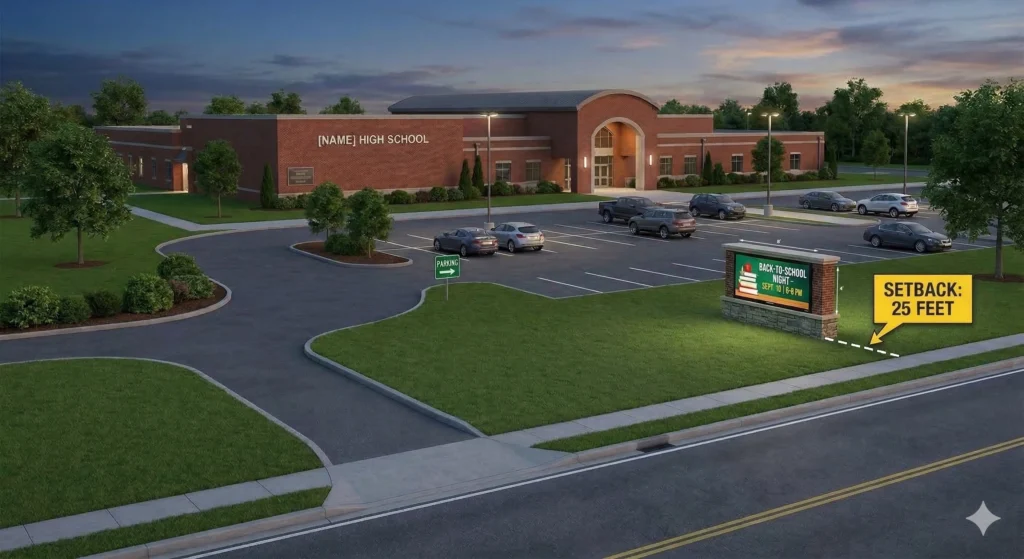
Be prepared to provide a rendering, illustration or site map when applying for a sign permit. You’ll typically need to show your sign physical size, and that your sign meets any setback requirements.
Keep outdoor messaging simple—because your audience has limited time
This is where many outdoor signs miss the mark. The temptation is to treat the sign like a mini website—multiple offers, full sentences, lots of details. But an outdoor sign isn’t read like a webpage. It’s read in a glance.
A good rule is to think in terms of one idea per message. Not one paragraph. One idea. For example:
- “NOW HIRING”
- “OPEN DAILY 9–6”
- “SERVICE SPECIAL THIS WEEK”
- “NEW ARRIVALS”
- “EVENT SATURDAY”
Those messages can be rotated, but each one should stand alone. When outdoor signs get complicated, people don’t “work harder” to read them. They just keep driving.
Location should match the decision moment
The best outdoor locations are usually the ones closest to the decision moment:
- The point where a driver decides whether to turn in
- The entrance where a visitor needs a direction cue
- The approach road where people slow naturally
- The frontage where your business needs visibility before it’s passed
If your sign is placed where people see it too late—after they’ve driven by, after the entrance, or where they can’t safely process the message—it’s not doing its job. Choosing the location first prevents you from spending time and effort on a sign that looks great but is positioned in a low-impact spot.

Frequently Asked Questions: Buying LED Signs

In most cities, yes—especially if the sign is an electronic message center (digital copy that changes). Permitting is usually tied to sign code rules such as where the sign can sit on the property (setbacks), how big it can be, and how the digital content can behave (motion/flash/hold times).
The easiest way to keep this from feeling overwhelming is to treat it like a short checklist before you finalize your location:
Confirm your zoning district and whether EMC/digital signs are allowed.
Confirm setback/right-of-way constraints so you don’t pick a location you can’t build in.
Confirm any message behavior rules (how long messages must hold, whether animation is limited, and night brightness limits).
That’s it. You’re not trying to “become a zoning expert”—you’re just verifying the location you want is realistic before you design around it.
For outdoor readability in sun, many outdoor LED products are commonly listed in the ~5,000+ NIT range, with some products around 5,000–5,500 NITs.
The reason “night dimming” comes up so often is that many local codes include brightness limits after dark. Some ordinances and code examples compile rules that cap daytime luminance higher and night luminance much lower (you’ll see examples like 5,000 NITs daytime / 500 NITs night in code compilations).
So the practical buyer answer is:
Plan for daylight visibility (sunlight + glare).
Make sure your system supports automatic dimming / scheduled brightness so it stays comfortable and compliant at night.
Start with viewing distance, not the spec sheet.
A widely used rule of thumb from Daktronics is:
Optimal viewing distance (feet) ≈ 3 × pixel pitch (mm)
Example: 10 mm ≈ 30 feet optimal viewing distance.
So:
Pedestrian / close viewing generally points you toward tighter pitch (because people are closer and can notice “blockiness”).
Roadside / longer viewing distances usually allows a larger pitch without losing readability, because distance blends the pixels together.
This varies by city, but a very common requirement you’ll see in sign codes is a minimum hold time around 8 seconds for each message, and a limited transition time between messages.
For example:
One municipal code example requires at least 8 seconds per message and limits transition time.
The OAAA compendium of state laws includes similar language for changeable message signs (e.g., static display time at least 8 seconds, transition no greater than 2 seconds).
From a buyer standpoint, the best “safe” guidance is:
Use fewer words per message.
Keep each message up long enough that someone can read it in a single glance.
Avoid “busy” effects—many codes explicitly prohibit continuous scrolling/flashing patterns.

Want a quick recommendation for your site?
Send us your sign location and estimated viewing distance, and we’ll point you to a good starting range for readability and pixel pitch.
Call 888-359-9558 for expert advice on where to place your LED sign.