
Choosing the Right Location for Your Indoor Sign
Indoor LED displays work best when placement matches
close-range viewing, natural sightlines, and the message goal.
Indoor LED Displays: Close Viewing, Message Purpose, and Safe Mounting
Indoor digital displays are usually viewed much closer than outdoor signs. Instead of reaching people in motion, indoor displays reach people who are walking, waiting, checking in, or spending time in your space. That changes both what you can say and how you should design it.
Indoor location planning is less about traffic speed and more about:
- How close people will stand or sit to the display
- How long they’ll be in view of it
- What the display is supposed to accomplish
Indoor viewing distance is closer—and that changes your design priorities
Indoor displays are often viewed from a short distance in places like:
- Lobbies and reception areas
- Hallways and entry points
- Waiting rooms
- Counters and checkout areas
- Conference areas or internal communication spaces
Because viewing distances are closer, viewers can handle more detail than they can outdoors. However, that doesn’t mean the message should become cluttered. It means you have more flexibility to:
- Use slightly smaller text (within reason)
- Show a few structured elements (like a schedule or directions)
- Include visuals that support the message
Your location choices should focus on where people naturally pause or look. For example, a display in a lobby should be positioned where it can be seen during the moment someone is getting oriented. A display in a hallway should be where foot traffic naturally flows, not where people only notice it after they’ve already passed.
What’s behind the wall?
Installing your LED sign safely requires an engineering check on the structural integrity of the wall where you plan to mount the sign.
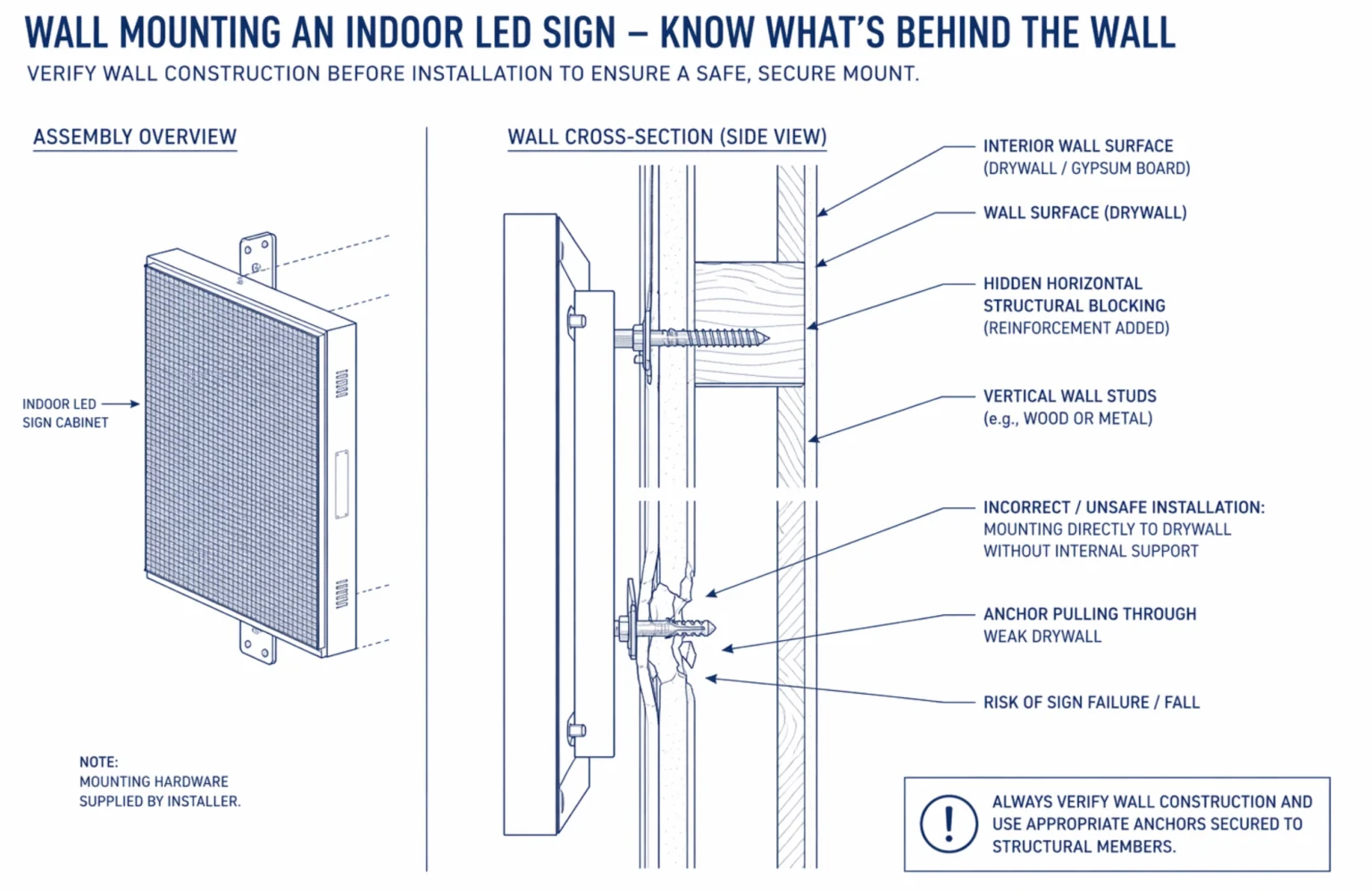
Indoor digital signs need to be in a safe mounting location
Unlike outdoor signs, indoor displays usually don’t involve zoning permits—but they do require something just as important: structural integrity. An indoor LED display (or video wall) has real weight. The safest, best-looking placement is only a good choice if the wall or structure can support the load.
Indoor planning should include:
- What’s behind the wall: Studs, concrete, masonry, metal framing, or drywall all affect mounting options.
- Weight and mounting method: Some installs require reinforcement, proper brackets, or a backing structure—especially for larger indoor LED displays.
- Cable paths and power: A clean install needs a plan for where power and data will run so the display doesn’t end up with exposed cords or awkward conduit.
- Safety and liability: Mounting needs to be secure for public areas. It’s not just “can it be seen?” It’s “can it be mounted safely, permanently, and cleanly?”
So while indoor location feels simpler because it avoids the permit process, it still needs to be chosen with the building structure in mind. Visibility matters, but safe mounting matters just as much.
Indoor locations should match the purpose of the message
Indoor LED displays work best when they are built around what you actually need them to do. For most organizations, indoor messaging falls into a few practical categories:
Wayfinding and direction
If your space is confusing, location matters. A screen placed too far “inside” doesn’t help someone who needs the direction at the entrance. When wayfinding is the goal, put the display where people make decisions—near entrances, elevator banks, corridors, and crossroads inside the building.
Information and expectations
In waiting areas, indoor displays can reduce confusion by showing what to do next. Examples include:
- Check-in instructions
- What to bring
- Hours and schedules
- Simple policies
- Reminders that reduce repeat questions
If the display is placed where people are already seated or standing, it becomes a quiet, consistent way to communicate.
Promotions and announcements
Indoor displays can also highlight offers, events, or internal announcements. These work best where people have time to absorb the message—such as near seating, queue areas, or places where visitors naturally pause.
Indoor displays do not need to be flashy to be effective
Indoor displays don’t need fast motion or constant animation. In many environments—healthcare, education, government, even retail—too much motion can feel distracting. Your location should support a clean, readable experience. If your indoor display is right near the entrance, keep content calm and clear. If it’s in a lounge area, you have more flexibility to rotate content because viewers are there longer.
The takeaway: Location first, then everything else
Indoor displays work best when placement matches real behavior—where people naturally pause, how close they’ll be, and what you want them to take in. Once you’ve nailed that, everything else becomes a lot more logical: you can plan for viewing distance, decide whether your content is mostly text, graphics, or photo realistic visuals, and build messages that feel clear instead of crowded. Next up in the Buyer’s Guide: Viewing Distance and Message Readability—because that’s what turns “a good idea” into a display people actually read.

FAQs: Choosing the Right Location for Your Indoor Sign

A consumer TV is built for a living room. A commercial-grade display is built for a business environment where it may run all day, every day. The biggest differences usually come down to duty cycle (16/7 vs 24/7), heat management, brightness, and warranty coverage for commercial use. In plain terms: if the screen will be on for long hours, in a public space, and needs to stay consistent, commercial-grade displays are designed for that workload. (Sources: DigitalSignage.com Display Selection Guide; RedyRef; Screenmoove.)
Start with the farthest typical viewer, then work backward. The best screen size depends on two things: how far away people will be, and what you want them to read. If your screen is mainly for schedules, directions, or announcements, you’ll want a size that supports large, easy-to-read text without cramming. If you want more visual content (photos, graphics, or motion), you can go bigger—but you still need a layout people can absorb quickly.
A useful rule of thumb you’ll see in AV planning is the “4-to-6 rule” (screen height is roughly one-fourth to one-sixth of viewing distance). It’s not perfect for every space, but it’s a solid starting point to avoid screens that feel too small to read. (Sources: Sabercom “4-to-6 rule”; Haverford/AVIXA DISCAS overview.)
Near windows, brightness isn’t about “more is better.” It’s about ambient light. In most indoor areas, 350–500 NITs is often fine. However, if the screen is facing daylight or sitting in a bright lobby, you may need something closer to 800 NITs or more to prevent the image from washing out. The real deciding factor is whether the display is competing with strong natural light during peak daytime hours.
If you’re unsure, do a quick real-world test: stand where your audience stands, at the brightest time of day, and look at the wall area where the screen will live. If the space is bright enough that paper looks “glary,” you’ll want a brighter display. (Sources: BenQ signage brightness guidance; Signagelive brightness guidance.)
No, a constant internet connection is not strictly required for a digital sign to display messages. Commercial displays are equipped with internal storage that caches your content, meaning the sign will seamlessly continue playing its scheduled rotation even if the network drops. However, an active internet connection is necessary when you want to update that content remotely. While it is possible to update signs manually on-site using a USB drive, over 85% of organizations now utilize cloud-based software. Cloud connectivity allows users to manage multiple displays instantly from anywhere, reducing the time spent on content updates by up to 90% compared to manual methods.

Start with the Space, Not the Screen
Choosing the right indoor LED display starts with understanding the space. Where the screen will be placed, how far away people will be, and how they’ll experience the content all play a big role in making sure the display feels clear, comfortable, and easy to follow. Every indoor environment is a little different, which is why it helps to think through those details before making a final decision.
If you’d like help talking through your space, call 888-359-9558.. We can help you look at location, viewing distance, and how the display will be used so you can move forward with more confidence.